Google Family Link
Screenshots
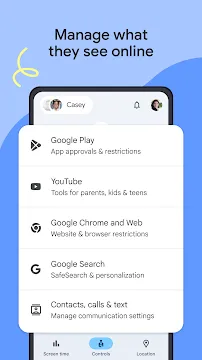
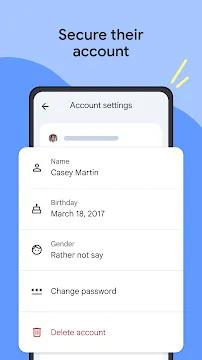
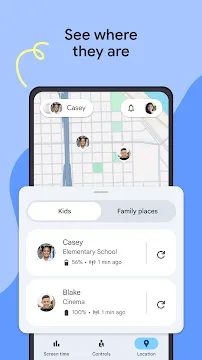
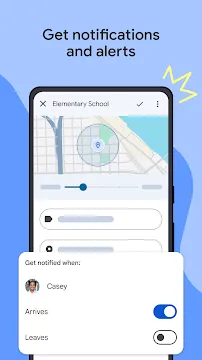
Google Family Link helps parents manage their children’s device usage. Parents want to keep kids safe online. Therefore, Google created a special tool for families. This tool gives parents control over connected devices. You can set digital ground rules easily. Consequently, children learn healthy digital habits early.
The app connects your phone to your child’s phone. Then, you can monitor their daily activity remotely. Parents can guide their children toward good content. Furthermore, you can secure their personal data. Many families struggle with screen time. Children spend hours looking at screens every day. This behavior can affect their sleep and schoolwork. Luckily, this tool offers a great solution. It balances screen time and real life. Parents feel more confident using this system. It changes how families interact with technology. You can create a peaceful home environment now. Begin your digital parenting journey today.
What is Google Family Link?
Google Family Link is a parental control tool. Google offers this tool for free to everyone. It links a parent’s account to a child’s account. Therefore, you can manage settings from your own device. Parents can view activity reports easily. These reports show how much time kids spend on devices. Additionally, you can see which tools they use most. This information helps you make smart choices.
Many parents worry about inappropriate content online. However, this tool helps you filter web results. You can block specific websites completely. As a result, your child explores the internet safely. The app works quietly in the background. It does not slow down the device. Thus, your child enjoys a smooth experience. It supports multiple accounts for large families. You can monitor each child separately. This feature makes management very simple. It provides peace of mind for busy parents.
Many young users do not understand online risks. They might click on dangerous links by mistake. Because of this risk, proactive monitoring is necessary. The app gives you the tools to intervene. You can see what they search for online. Then, you can block bad downloads before they happen. This tool acts like a digital safety net. It allows kids to learn with supervision. Parents can adjust settings as kids grow older. Consequently, the rules change with their maturity level. This long-term utility makes it very valuable.
How to Set Up Google Family Link
Setting up Google Family Link requires a few simple steps. First, download the app on your personal device. Then, open the app and follow the prompts. You will need a Google account for yourself. Next, you must create a Google account for your child. The app guides you through this process quickly.
After that, follow these direct steps to link the devices:
- Grab your child’s device.
- Log into their new account on that device.
- Enter the linking code from your phone.
- Customize the initial safety settings.
- Choose daily limits that fit your family schedule.
- Set a bedtime for the device.
Consequently, the two devices will connect immediately. Finally, review the initial permissions. The setup process takes less than ten minutes. Anyone can complete it without technical skills. It connects over the internet instantly. Then, you gain full remote access.
You should check connection stability during the setup. Both devices need a working internet connection. Otherwise, the linking process might fail midway. If you encounter issues, restart both phones. Then, attempt the connection process again. Once connected, the settings update over the cloud. Therefore, you do not need to hold their phone again. Any changes you make apply within seconds. This remote control feature saves a lot of time. It allows you to manage things on the go.
Key Features of Google Family Link
The features of Google Family Link offer deep customization. Parents can lock devices remotely at any time. For example, you can lock phones during dinner. This encourages real-world family interaction. Furthermore, you can track your child’s location. The app displays their location on a map. This feature provides peace of mind for parents. You always know if they arrived at school safely.
Here are the core tracking options available:
- Remote device locking.
- Real-time location tracking.
- In-app purchase management.
- Hidden app control.
Additionally, you can manage in-app purchases. Kids must ask for permission before buying items. Therefore, you avoid unexpected credit card bills. You can also hide specific apps on their screen. If an app seems distracting, turn it off. The child will not see it anymore. This control keeps them focused on tasks. It removes temptations during homework hours.
Managing privacy settings is another great feature. You can control the permissions of each app. For instance, you can block access to the camera. You can also restrict microphone use for specific tools. This stops apps from collecting data without your knowledge. Consequently, your child’s identity stays fully protected. Parents can review these permissions at any time. If an app changes its policy, you get an alert. Then, you can revoke permissions immediately. This keeps your family safe from data leaks.
Managing Screen Time with Google Family Link
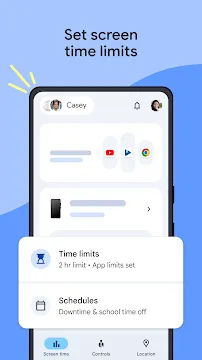
Screen time management is a primary goal for many families. Children often lose track of time while online. Therefore, parents must establish clear boundaries. You can set daily limits for device use. For instance, allow two hours of use per day. Once the time expires, the device locks automatically. However, the child can still make emergency calls. This safety feature remains active always.
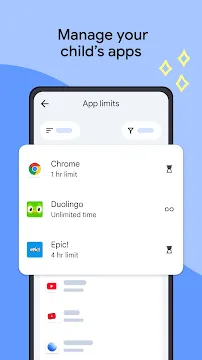
Parents can also set individual app limits. Maybe your child spends too much time on video apps. You can limit that specific app to thirty minutes. Meanwhile, educational tools can remain open longer. This flexibility helps children balance entertainment and learning. You can adjust these limits instantly from your phone. Then, the changes apply immediately to their device. It prevents long arguments about turning off the phone.
Bedtime schedules help children get better sleep. You can set a specific time for the phone to lock at night. For example, the phone locks at eight PM. It unlocks automatically the next morning. Because the phone is locked, children sleep without distractions. They will not stay up late texting friends. Consequently, they wake up refreshed for school. This routine builds healthy lifelong habits. Parents can also grant bonus time if needed. If they finish chores, reward them with thirty extra minutes. This makes screen time an effective reward system.
App Approval with Google Family Link
Content filtering keeps young minds safe from harm. The digital world contains many inappropriate things. Fortunately, parents can control what children download. When a child requests a new app, you get a notification. You can approve or deny the request immediately. This system ensures you know every tool on their phone. Furthermore, you can filter mature content on search engines.
Google Chrome filters explicit sites automatically with this tool. You can also restrict search results on YouTube. However, no filter is perfectly flawless. Therefore, parents should still talk to their kids about online safety. This combination of tools and talk works best. You can also manage website permissions manually. Add specific web addresses to an approved list. Then, your child can only visit those sites.
The app approval system operates in real time. Your child taps download in the store. Then, a pop-up asks for parental permission. You receive a text notification on your personal device. The notification includes details about the app. You see its age rating and data requirements. Therefore, you make an informed decision instantly. If you approve, the download begins automatically. If you deny, the app remains blocked. This prevents the installation of harmful software. It keeps the device safe from viruses too.
Tracking Location Safely and Accurately
Location tracking helps parents stay connected in the physical world. Children walk to school or visit friends often. Therefore, knowing their location reduces parental anxiety. The app uses the device’s GPS to find them. You open the map on your phone to see their spot. Additionally, you can set up notifications for specific places. For example, receive an alert when they reach school.
You can also see the battery life of their device. If their battery runs low, you know why they do not answer. This feature requires an active internet connection on both devices. It helps families stay safe during outdoor activities. You can see their movement in real time. This adds another layer of security for your family.
Privacy remains a priority during location tracking. The location data stays private between family members. Google secures this information with strong encryption. Therefore, unauthorized people cannot see your child’s whereabouts. You can turn off tracking whenever you want. Some parents only use it during weekends. Others keep it active during school hours. This customization allows you to respect your child’s privacy. It balances safety with personal freedom perfectly. Thus, it builds trust between parents and children.
Conclusion
Google Family Link provides excellent tools for modern parenting. It simplifies the task of digital supervision. Parents can set healthy boundaries without constant arguments. Children receive guidance while exploring the online world. Consequently, families build better tech habits together. The setup process is quick and straightforward.
The features adapt to different age groups easily. Therefore, the app grows with your child over time. You maintain control while giving them independence. Download the app today to protect your family. It is a reliable choice for every parent. Start managing their digital life right now.